Demo Version New interfaces available!
|
|
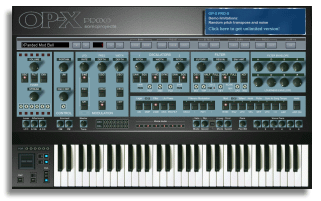
Click on the Bank:Load button to load one of the additional banks.

Load the PROII_TESTPATCHES bank for a feature tutorial.
Learn more about the built-in banks
here..
|
Limitations:
- short audio breaks
Changes / version history:
click here
- restart needed after 20 minutes
Newest version 1.3.2:
|
|
Video: How to switch interfaces
|
|
| |
Windows 64bit:
|
VST3
|
|
Minimum system: Windows 10 64bit
|
|
| |
Mac universal:
|
AU, VST3
|
|
Minimum system: OS-X 10.13
|
|
If you use an older system or need VST2 or 32bit support check the previous versions below
MacOS: Restart the system after installation
Ableton Live:
Activate "Audio Units v2" and "Use VST3 Plug-In system folders"
in Preferences > Plug-Ins
Top new features:
- Native M1 support (universal)
- In-Plugin switchable GUI
full list here
To switch interfaces click here:
 GUI-Swicher video
|
|
1.2.6 tutorial (still without GUI-switcher)
|
SOUNDS AND DEMO SESSIONS
|
Learn more about the built-in banks library here:.
Banks Info Site
Download ready-to play demo sessions for various sequencers:
Download Demo Sessions
Watch 1.3.0 release trailer video:
Release Trailer Video
IMPORTANT NOTE:
The AU plugin of version 1.3.0 ff isn't session-compatible to version 1.2.6. Which means used AU instances will load with default sound.
To transfer former sessions open each used instance still with 1.2.6 installed, save the used sound using PRESET SAVE and add the track
name/number in the saved file name. With the new version installed then open each instance, load the correct sound using PRESET LOAD and
then re-save the session, the best with a new name to have a backup of the old.
|
Previous versions:
|
INTERFACES INFO: Click
here.
Ableton Live windows: Use the VST2 version
more info
|
| |
|
SYNTH INTERFACE:
|
| |
Windows 32bit:
|
VST2
|
|
Minimum system: Windows XP SP2
|
|
| |
Windows 64bit:
|
VST2, VST3
|
|
Minimum system: Windows 7 64bit
|
|
| |
Mac 32 & 64bit:
|
AU, VST3
|
|
Minimum system: OS-X 10.8
|
|
| |
|
RACK INTERFACE:
|
| |
Windows 64bit:
|
VST2, VST3
|
|
Minimum system: Windows 7 64bit
|
|
| |
Mac 32 & 64bit:
|
AU, VST3
|
|
Minimum system: OS-X 10.8
|
|
MacOS: Re-boot after installation
Monterey / M1 silicon:
click here
IMPORTANT NOTES: click here
Free VST Host
|
The plugin needs a vst or au host to run. If you don't have a one here some recommended free hosts:
Free VST host for Windows:
Download SaviHost 32bit
Download 64bit version from developer:
www.hermannseib.com/english/savihost.htm
Note the 32bit version also can be used in a 64bit system if needed.
Installation: Just place the "savihost" file next to the "OP-X PRO-II.dll" and rename
it too to "OP-X PRO-II". The dll can be found in a folder called "SonicProjects" in
the place you've installed the plugin to. Now simply doubleclick the renamed file to launch the plugin.
In "Devices->Wave" and "Devices->MIDI" you still have to choose the right audio and MIDI
drivers. If you dont have an ASIO soundcard then install the free Asio4All drivers:
www.asio4all.com

Free AU Host for Mac:
http://ju-x.com/hostingau.html
Free ($1) Meta-Plugin for Mac to use within Protools or VST2-Hosts:
https://kushview.net/element/
|
IMPORTANT NOTES | for version 1.2.6 and 1.1:
MAC:
If GateKeeper blocks installation then right-click the installer
and choose "Open" to install.
If the interface should freeze during playing then close and
re-open it. Read more here.
If this should happen regularly then deactivate the keyboard
and led animation by switching off the upper blue square button
next to "A" in the levers section.
Ableton Live Mac: Make sure that use of AU plugins is activated.
Read more about it here.
MacOS High Sierra 10.13 and higher: After first installation of the
plugin you have to restart the computer. Only after re-booting
the plugin will be detected and validated.
MacOS Big Sur: If you have crackling noises when playing
chords
then read this.
Silicon M1: The synth fails validation in Logic. For installation
in M1 Macs follow this guide: click here
Tested hosts:
Logic Pro 9, Logic Pro X, Ableton Live 9, Cubase 7,
Cubase 8, Studio One 2, Studio One 3,
Garage Band, MainStage 3.2.4
WIN 64bit:
If SmartScreen blocks the installer then click on "More info"
and here choose "Run anyway".
If the installer doesn't launch immediatly after double-clicking it
or after skipping smart screen this may be caused by your virus
scanner scanning it, so simply wait until it's done.
If it never launches even after waiting then temporarily de-activate
your virus scanner and launch the installer once more.
The installer puts no system files, just the plugins and a data folder
to the plublic documents folder, so it's 100% save.
Ableton Live:The VST3 version has a bug which makes the inteface
cropped. Simply use the VST2 version instead.
Tested x64 hosts:
Cubase 5 x64, Cubase 8 x64, Ableton Live 9 x64, Sonar X3 x64,
Reaper 5 x64, FL Studio 12 x64,
Studio One 2 x64, SaviHost VST3 x64, Cantabile 2 x64,
Forte x64
WIN 32bit:
Note you can run this version too in a 64bit system when using
a 32bit host or a 64bit host with included bridge.
More infos about this: Click here to read
So you e.g. can can play it with the free SaviHost host linked
above in any 64bit system just fine.
The version 1.1 32bit version is the longest proven version and
has been stable for years now. It has near zero idle load and so
is very cpu friendly in multiple instances sessions.
Tested x32 hosts: Nearly all available during the past years
PATCH COMPATIBILITY INFO:
The new version 1.2 for Mac and Win x64 uses a new proprietary
patch format and already includes all available banks ever released
until the date of its release, about 2'500 sounds.
The Windows 32bit version still uses the former fxb/fxp format and
includes about 1'500 sounds on installation. About 1'000 more sounds
can be downloaded on the sound reloads site.
The full version license includes a patch transfer tool which allows
to convert between the old and the new format if needed.
Minimum system requirements:
PC:
- Windows XP SP2 or higher
- A 32bit vst host or a 64bit vst host
- ASIO drivers info
- Minimum CPU: Core2Duo
- Best Performance: Core i5/i7
Windows laptops should be optimized for the use of VST instruments.
Click here for a guide.
You are new to the world of virtual instruments? Then click here
for a beginners guide.
MAC:
- OS-X 10.8 or higher
- An AU or VST3 host
- Minimum CPU: Core2Duo
- Best Performance: Core i5/i7
Protools RTAS and AAX aren't supported, but it should be possible
to use the plugins in Protools with meta-plugins like DDMF Metaplugin
or Blue Cat's PatchWork.
RTAS: Fxpansion adapter windows only. Learn more here.
|
Note that these system requirements are just a basic guardrail and aren't mandatory.
You have to try the demo version to find out if and how the synth works in your
environment. If the demo version works the full version will too.
CPU consumption / multiple instances:
How many instances you'll be able to use in a session of course depends on both
the CPU and the used buffer size of the ASIO or CoreAudio drivers. Since the synth
is relatively easy on CPU for today's standards you even should be able to run many
instances in medicore systems.
Here are some test sessions we also use for our own tests:
Test sessions for the Mac / Win x64 version:
Mac/x64 Release Trailer Session | for version 1.2.6:
This is the original session we used in the version 1.2 release trailer and we
also used for testing various Win x64 and Mac sequencers. It's 8 instances of OP-X PRO-II
used for all sounds including drums. Available for various sequencers:

Download session:
download
Test sessions for the 32bit windows version:
Cubase 5 Demo:
Here's a short Cubase 5 demo using 7 instances:
Download session:
download
Live 8 Demo:
The same session with Ableton Live 8.2 on a medicore office PC without a dedicated
soundcard just using Asio4all drivers:
download session
Protools 8 Demo:
The synth works well in Pro Tools 8 (Windows only) when converted to RTAS with the
newest (2.1.1) Fxpansion VST to RTAS adapter:
www.fxpansion.com
21 Instances Session:
Here's an ultimate stress test session featuring 21 instances of OP-X PRO-II in two
systems and several different sequencers:
download session
Notebook Demos:
Here are two videos showing OP-X PRO-II perform in a netbook and in a $300 class notebook.
The notebook runs 11 instances with ease:
download bank
|
32bit version only: Windows Vista / 7 / 8 Notes:
If your plugins folder resides within the program files folder it may be
needed to run your vst host in administrator mode.
For this right-click on the application shortcut, choose "compatibility"
and check "run as administrator". This gives back full writing rights.
More about it here.
Cubase 5 and up:
Also works fine without running in administrator mode based on our various tests, but simply be aware that
if the plugin resides within the system's program files folder (e.g. VST2 plugins folder) the licensing
data and newly created banks and presets will be written to virtual store instead to the conceived place. So if you
need to have direct file access to those (e.g. for backup) you'll find them there instead of the place
where you expect them to be.
More about it here.
The new version 1.2 for Win 64bit and Mac uses a different new file location which resides
outside the protected area, so using this version you don't have to deal with this.
KEYWORDS:
OP-X PRO-II free download
OP-X PRO 2 free download
OP-X PRO-II 1.3.0 free download
OPX PRO 2 version 1.3.0 free download
|