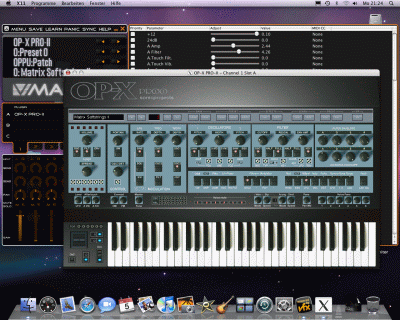
Requirements:
- Any intel based mac
- OS-X 10.5.x or higher with installed X11
Installation was as fast and easy as in windows systems.
Demo Version
|
NOTE: Since there's a native AU and VST3 version
for Mac available now this old VFX Edition demo version box only still is
there as link source for existing VFX Edition owners if there should be a need
to
re-download VFX, X11 or SoundFlower.
The native AU and VST3 demo version is available on the standard
demo version page.
Installation guide and links for needed files and apps for the former OP-X PRO-II VFX Edition:
1. Mountain Lion or higher: Download and install the newest X11 / XQuartz as noted below in the important note
xquartz.macosforge.org
2. Download and install the newest (20100505 or newer) VFX application from www.smproaudio.com
3. To unblock VFX launch it manually for the first time like this:
Open the Finder, goto "Applications", look for the yellow VFX icon. Right-click/Ctrl+Click/Two-Finger-Tap on it so that the context menu is shown, and here choose "Open".
4. Doubleclick the "OP-X PRO-II Demo.vfxlibrary" and import it
If doubleclicking the file shouldn't launch VFX and start the import then you also
can import it manually: 1. Launch VFX 2. Click on the small white vfx icon on the top
left and here choose "File->Import from VFX Library..." and browse to the OP-X PRO-II.vfxlibrary file and import it.
If you should have a crash then re-boot your system and try again.
If you should have no instrument interface or no sound then check this FAQ article.
Video installation guide:

IMPORTANT NOTE:
In the new Mountain Lion the needed X11 isn't installed by default and older
versions left from previous systems may not work. Here are the links to the
apple notes and the new version:
support.apple.com/kb/HT5293
xquartz.macosforge.org
|
HOW TO USE SOUNDFLOWER
You can use the free SoundFlower from Cycling74 to route the audio
output of VFX to a sequencer to be able to record it on a track. This
works flawlessly in realtime.
SoundFlower can be downloaded here:
http://code.google.com/p/soundflower/
There's also a way to route MIDI from your sequencer to VFX so that you
first can record and edit a track in MIDI format before recording to audio.
This can be done using the virtual IAC MIDI driver in the Audio/MIDI settings
of your system.
How to set up everything is described in detail in the pdf installation guide
included in the demo version download package based on Leopard refering to Garage Band.
Here's a video how it works with Logic Pro 9 in Mountain Lion:
Here's a video how it works with Ableton Live 9 in Mountain Lion:
IMPORTANT:
Always deactivate record enable on a MIDI track that has the output
set to IAC for playback. Otherwise there will arise a feedback loop which can freeze the host.
Logic unfortunately automatically record-enabels tracks on selecting or changing the output.
So after switching to IAC for playback immediatly again deactivate record-enable.
Here's the older video still based on Leopard and Garage Band:

If you want to match the tempo of a synced arpeggio to your song then this can be done
by adjusting the internal VFX host tempo to the same tempo the song uses:
If you want to create layers, midi channel separated instances or keyboard splits using multiple instances of OP-X PRO-II
then watch this video to learn how to do it:
IMPORTANT APPLICATION NOTE
Since the graphical user interface (GUI) is handled over the separate
X11 application the GUI has a minimal but noticeable delay over the
audio processing engine. Since the two are linked tweaking parameters
on the GUI is not as fluent and smooth as it should be.
Even more important is that this behaviour can lead to delayed notes
on articulated and fast playing when the keyboard animation is active.
That's why it simply can be deactivated with this button:
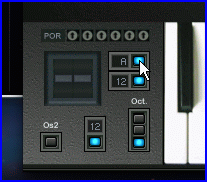
This setting will stay presistent as long as the plugin is active. Since the
keyboard animation is just a nice visual effect and is not really needed we
recommend to switch it off by default for better response.
MIDI learn: In order to make settings persistent you need to change VFX banks
once. Just create a new empty VFX bank for this. Intense use of controllers
however is not recommended since X11 doesn't allow for smooth operation.
NOTE: Since there are native AU and VST3 versions for Mac available now this page about
the former VFX Edition workaround version only still is there for documentation purposes. To check out the new native Mac versions
visit the demo version page which offers all needed infos.