products reviews buy news support
OP-X PRO-II out!      Click here!
home/news     products     audioclips     videodemos     newsounds     downloads     testimonials     purchase     freedemo    
Support Site Intro:

This site tries to answer various questions related to our plugins and offers links to useful ressources. If your question can't be answered here then don't hesitate to contact us by email:

Contact SonicProjects

How can I get the new Mac and 64bit versions of Stringer as a licensee?

How can I get the new Mac and 64bit versions of OP-X PRO-II?

Lost your license data? Click here for help

Licensing issues? Click here for help

OP-X PRO-II - FAQ and fast help for 32bit windows version

OP-X PRO-II - FAQ and fast help for Mac and 64bit version

OP-X PRO-3 / OP-MTX - FAQ and fast help

OP-X PRO-II fails AU validation in M1 macs. Is there a fix for this?

OP-X PRO-II version 1.3.0: pitch and modulation levers spring back unwantedly

Stringer 3.0 and 2.0 - FAQ and fast help

Mac Logic Pro X: I always get an invalid user id/license key message. Any help?

MacOS Sequoia: Does OP-X PRO-3 work in it? Has it been tested?

MacOS Ventura: Does OP-X PRO-II work in it? What about M1?

MainStage: OP-X PRO-II returning to default sound. Any help??

Crackling and popping noises when playing full chords in Big Sur. Any help?

How can I make the interface bigger?

Error when trying to unpack a dowloaded zip file? Click here for fast help

Crackling sound or delay? A guide how to optimize your laptop computer

Licensing issues? Click here for fast help

Issues after switching to Vista/7/8 or updating sequencer? Click here for fast help

New to the world of virtual instruments? Click here for a beginner guide

No sound with Asio4all? Click here for a guide how to fix it

OS-X Yosemite: No instrument interface and no sound in VFX? Click here for fast help

MacOS High Sierra 10.13: AU plugin not found or crashing. Any help?

Problems, need help? Visit our new FAQs site for quick answers to various questions:

Frequently Asked Questions

A specific installation support site for the V-Machine Bundle:

VM Bundle Support Site

Sound reloads:

The full versions of the OP series plugins come with a huge collection of additional soundbanks in fxb format that can be loaded by almoust every vst host as well as Receptor.

Additional to this there are released new banks for free download on a regular base directly on this site. Here are the links to the dedicated download sites:

OP-X and OP-X PLAYER

OP-X PRO

OP-X PRO-II

OP-X PRO-3

Manuals:

Download the comprehensive bookmarked pdf manuals that contain a linked index. The free Acrobat reader is needed to open the manuals.

OP-X manual

OP-X RRO manual

OP-X FREE manual

OP-X PLAYER manual

VM Bundle manual

Stringer 2.0 manual

Stringer 3.0 manual

Stringer 3.1 manual

OP-X PRO-II 1.1 manual

OP-X PRO-II 1.2 manual

OP-X PRO-II 1.2 Rack Edition manual

OP-X PRO-II 1.3.0 manual Synth Interface

OP-X PRO-II 1.3.0 manual Rack Interface

OP-X PRO-3 manual

OP-X PRO-3 start basics guide

OP-X PRO-3 Programmer's Edition manual

OP-X PRO-3 Programmer's Edition start basics guide

Tutorials

Here are the links to the official tutorial videos:

OP-X PRO-II - Official Tutorial

Stringer - Official Tutorial

OP-X PRO-3 - Official Tutorial - Programmers' Edition

OP-X Reaktor Automation:

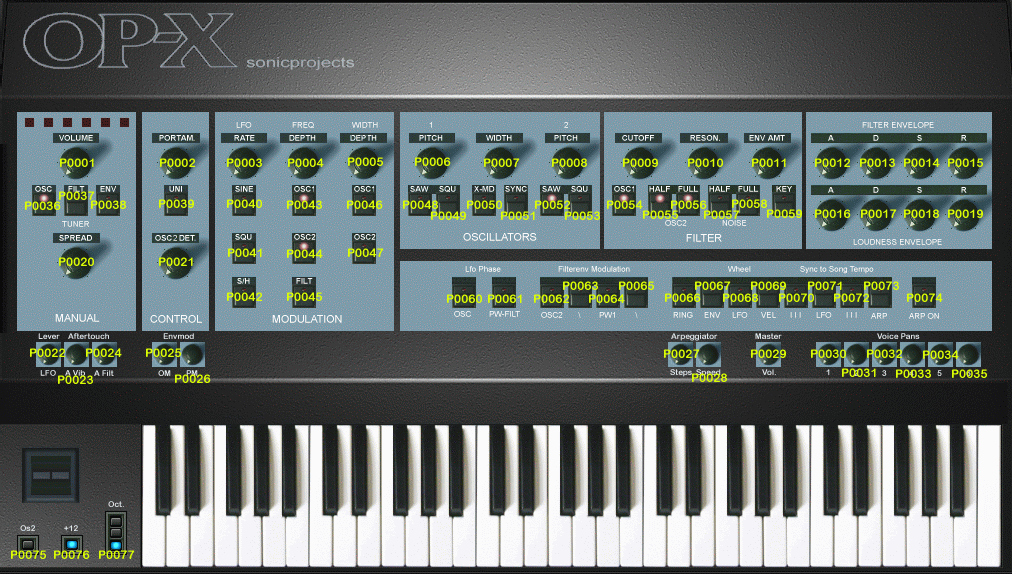
In mac based au and rtas sequencers the automation parameters only show up as cryptic numbers. Check this pic to see how those are allocated to the parameters:

OP-X Reaktor Automation Numbers (pic)

OP-X Reaktor Automation Numbers (text)

OP-X PRO-II Preset List:

Our customer Rob Mitchell has shared a list of all OP-X PRO-II factory presets sorted by banks in an excel format file. Thanks a lot Rob! You can download it here:

OP-X PRO-II Presets (excel format, zipped)

Updates and latest versions: 

These are the latest version numbers of all available and also discontinued plugins:

OP-X VST:  2.1

OP-X Reaktor:  2.3

OP-X PRO:  1.2

OP-X FREE:  1.0

OP-X PLAYER:  1.0

Stringer:  2.0 (Win 32bit)

Stringer:  3.5 (Win 64bit and Mac)      and 3.6 Beta

OP-X PRO-II:  1.1 (Win 32bit)

OP-X PRO-II:  1.3.2 (Win 64bit and Mac)      and 1.3.3 Beta

OP-X PRO-3:  1.0.3 / 1.0.6 Programmer's Edition      and 1.0.9 Beta

The Betas are available in the version history sections both in the dedicated login areas (full version) and for the demo versions on the version history sites linked on the dedicated demo version sites. The betas fix specific issues and once proven for a long enough time may become the new major versions. But before this only use them if you have the described specific issues or other issues they may fix too.

Product comparison:

These comparison tables help you to compare features between the various OP-X models. Available for purchase only still are OP-X PRO-II and OP-X PRO-3:

Comparison table: OP-X FREE / OP-X PLAYER / OP-X / OP-X PRO / OP-X PRO-II

Comparison table: OP-X PRO-II vs. OP-X PRO-3

Compatibility:

System compatibility of the still available plugins:

The available plugins all are at the newest system compatibility and security standards. They all are native 64bit, offer native M silicon compatibility, support Windows 11 and macOS Tahoe, and are certified by Microsoft and Apple. The offered plugin formats are VST3 and AU.

Older versions of OP-X PRO-II and Stringer in Windows still offer native 32bit and VST2 versions and compatibility down to Windows XP SP2, and on Mac down to 10.8 (OP-X PRO-II) and 10.10 (Stringer), but no VST2 here

The plugins need a plugin host to run. So they don't offer a stand-alone version. For a quasi stand-alone mode in Windows check the SaviHost setup guides in the last article.

OP-X PRO-II:

Newest version: Windows minimum Win 10, Mac minimum 10.13

Older versions: Windows down to Windows XP SP2, Mac down to OX-X 10.8

Stringer:

Newest version: Windows minimum Win 10, Mac minimum 10.13

Older versions: Windows down to Windows XP SP2, Mac down to OX-X 10.10

OP-X PRO-3

Windows minimum Win 10, Mac minimum 10.15

A word about converters:

Digital systems only can sound as good as the digital-to-analog converters used to get the sound out of the box. They can vary drastically in their quality, not superficially, but when it comes to details, transparency, smoothness and clarity, all aspects from which analog synthesis lives. That's why the quality of the converters have a big impact on the sound of OP-X. Only a good set of converters will let all the important details and depth come through. The most important part of a converter is its sample clock. The more stable it is the better is the sound. The more jitter there is, the more the signal is destroyed. The actual converter chip is the cheapest part, today's budget soundcards often have the same converter chips built in as the expensive high end devices. But they have a worse sample clock and an inferior analog wiring. Most modern laptops however have very good sounding and transparent converters, especially the Apple MacBook Pro notebooks. In these the built-in output in most cases sounds as good that you don't necessarily need a dedicated external audio device if stereo out suffices.

I'm new in the world of virtual instruments.
What do I need to run those plugins?

The virtual instruments we offer are in fact computer programs that use the cpu of the computer to emulate a specific sound which is converted back to an analog signal by a soundcard.

What you need to use the plugins:

1.
A windows or macintosh computer, desktop ot laptop / notebook. For the system requirements check the dedicated demo version sites.

2.
A so called "Host" which is a program that can load and play plugins. There are live-hosts for pure playing and sequencers (also called DAW, Digital Audio Workstation) for multitrack recording. Here are some recommended free or cheap live-hosts: recommended free hosts

3.
Windows: An audio device that offers ASIO drivers that allows for low latency performance (no delay while playing). If you have no dedicated audio device you also can install the free ASIO drivers from asio4all which works together with the built-in soundcard.

4.
A midi keyboard. This can be a normal synth with midi output or a midi controller keyboard. The midi output of this one will be connected to the midi input of your soundcard. Modern midi keyboards have an USB connector that you can connect directly to the computer.

Setup guides:

For a step-by-step setup guide for SaviHost (Windows, free) and MainStage (Mac, $29) with the example of OP-X PRO-3 check this site:

Setup guides

It works the same for OP-X PRO-II and Stringer.