MacBook Neo tested by SonicProjects

The Apple macBook Neo tested with the plugins from SonicProjects
You can download the featured sesson and concert here:
20 instances OP-X PRO-3 session for Logic Pro 12.0.1:
Download Session
Mixed concert using OP-X PRO-3, OP-X PRO-II and Stringer for MainStage 4.0:
Download Concert
Used plugins:
OP-X PRO-3 version 1.0.6:
https://www.sonicprojects.ch/opxpro3/
OP-X PRO-II version 1.3.2:
https://www.sonicprojects.ch/opxpro2/description.html
Stringer version 3.5:
https://www.sonicprojects.ch/stringer/description.html
The sessions also should work with the demo versions of the plugins, but you'll have repeated audio breaks and you'll have to quit
and re-launch the sequencer after 20 minutes, which both are the demo version limitations.
Setup details:
Read the video description in YouTube.
In both the 20 instances Logic Pro session and the MainStage concert we used 128 samples buffer size and 44.1 kHz sampling rate and only used the laptop's built-in audio.
Logic Pro reported a roundtrip (intput to output) latency of 10.0 ms and and output latency of 5.4 ms, and MainStage (with activated safety buffers) reported a roundtrip latency of 11.2 ms
and an output latency of 8.3 ms.
During the sessions the audio was captured in realtime with QuickTime with high quality audio activated in AIFC format using the loopback driver from Black Hole:
https://existential.audio/blackhole/.
The captured AIFC audio then later on were converted to WAV and mixed with a tad bit of the (nosiy) camera mic in the video in order to be able to
hear mouse and keyboard clicks.
CAUTION: De-activate "Stable Audio"!
Unfortunately the new by default active YouTube feature "Sable Audio" amplifies this camera mic noise in gaps to maximum volume which is completely idiotic.
You can de-activate "Stable Audio" which acts like a cheap pumping compressot like this:
Computer: Click the gear icon at the bottom right of the video and de-activate the "Stable Audio" switch at the top.
Smartphone: Tap on the video, click the gear icon at the top right, then here choose the "More" gear icon at the botton, and then deactivate
the 3rd from top "Stable Audio" switch.
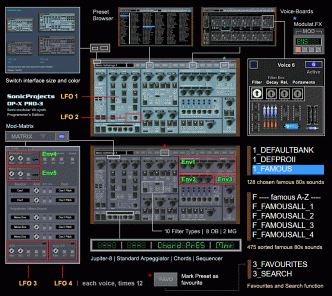
OP-X PRO-3 overview - click to enlarge:
Learn more about the new "Programmer's Edition
here.
|